
Skip To Main
  • Shop
    • VEEV ONE
      • VEEV ONE Device
      • Pods
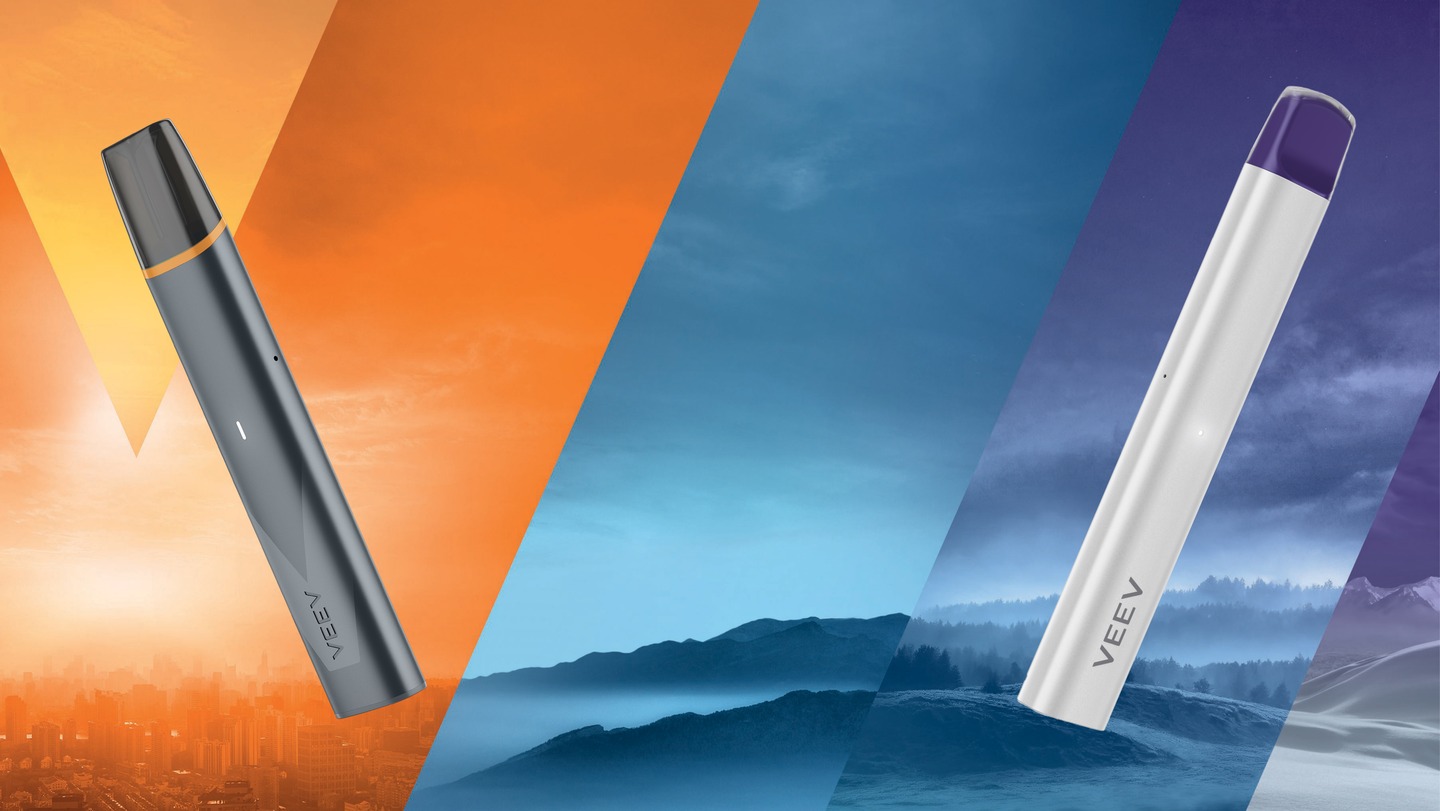
      veev one vape device feel the difference
      FEEL The DIFFERENCE in vaping Explore now
    • VEEV NOW ULTRA
      VEEV NOW ULTRA Strawberry flavour disposable vape with a red V logo background and a label saying up to 1200 puffs
      High quality flavours? ULTRA efficiency? Buy now
  • Discover VEEV
    • Discover VEEV ONE
      VEEV Vaping Made Right
      Discover a variety of flavours with the VEEV ONE pod-based system and VEEV NOW disposable vape. Discover VEEV
    • Discover VEEV NOW ULTRA
    • VEEV News
iqos Logo
  • Support
    • Troubleshooting Fix you device issues with our step-by-step guide
    • FAQ Find the best answers to your questions
    • Get More Support Find personalized guides and solutions for your device.
  • Important Information
  • Find a store
  • 562C2D68-971C-429B-AA1D-B87DA05127F8
  • Shop
    • Shop
    • VEEV ONE
      • VEEV ONE
      • VEEV ONE Device
      • Pods
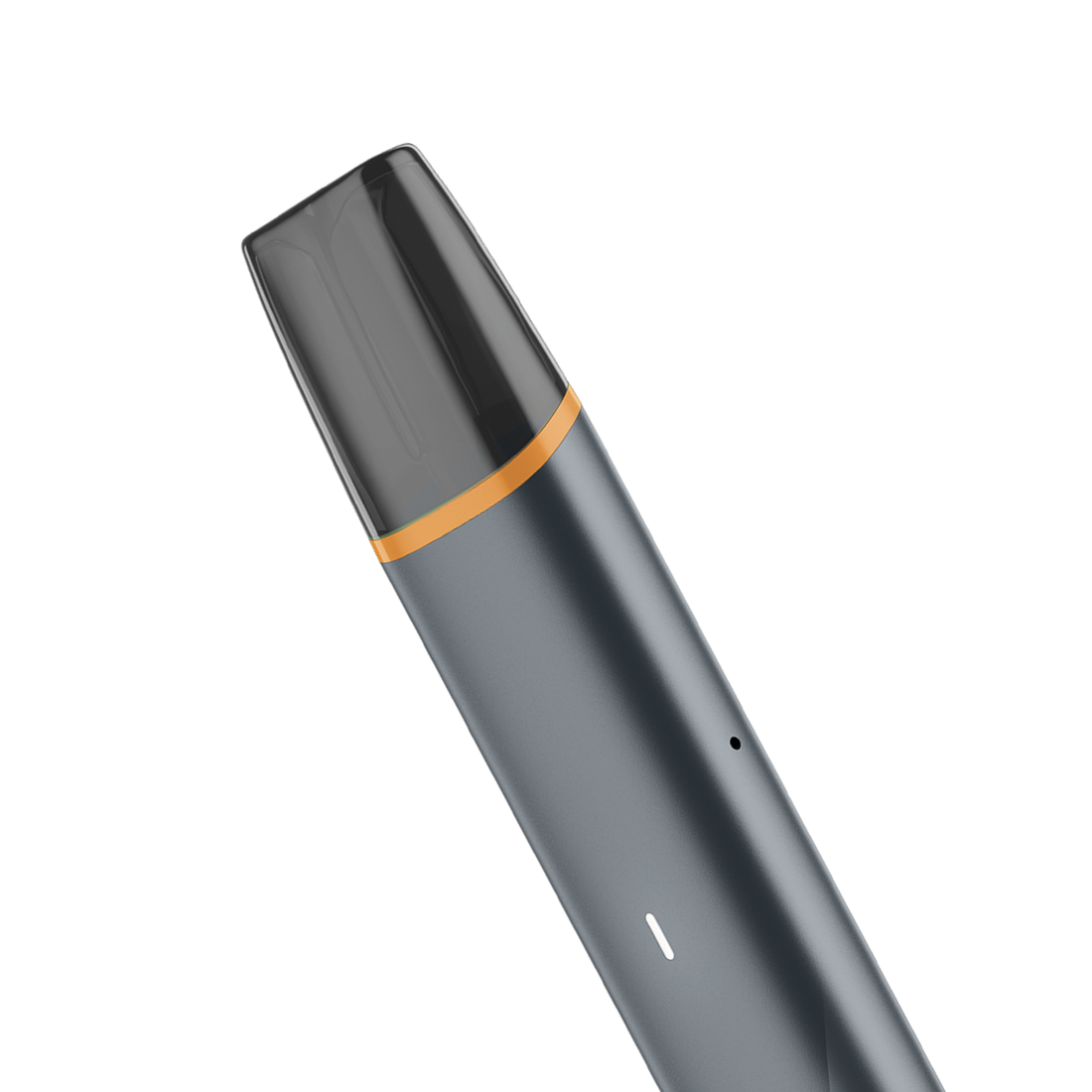
      veev one vape device feel the difference
      FEEL The DIFFERENCE in vaping Explore now
    • VEEV NOW ULTRA
    veev one vape device feel the difference
    FEEL The DIFFERENCE in vaping Explore now
  • Discover VEEV
    • Discover VEEV
    • Discover VEEV ONE
    • Discover VEEV NOW ULTRA
    • VEEV News
    VEEV Vaping Made Right
    Discover a variety of flavours with the VEEV ONE pod-based system and VEEV NOW disposable vape. Discover VEEV
  • Support
    • Support
    • Troubleshooting Fix you device issues with our step-by-step guide
    • FAQ Find the best answers to your questions
    • Get More Support Find personalized guides and solutions for your device.
  • My Account
  • Important Information
  • Find a store
  • My Account
  • Indonesia
  • English
iqos Logo
562C2D68-971C-429B-AA1D-B87DA05127F8

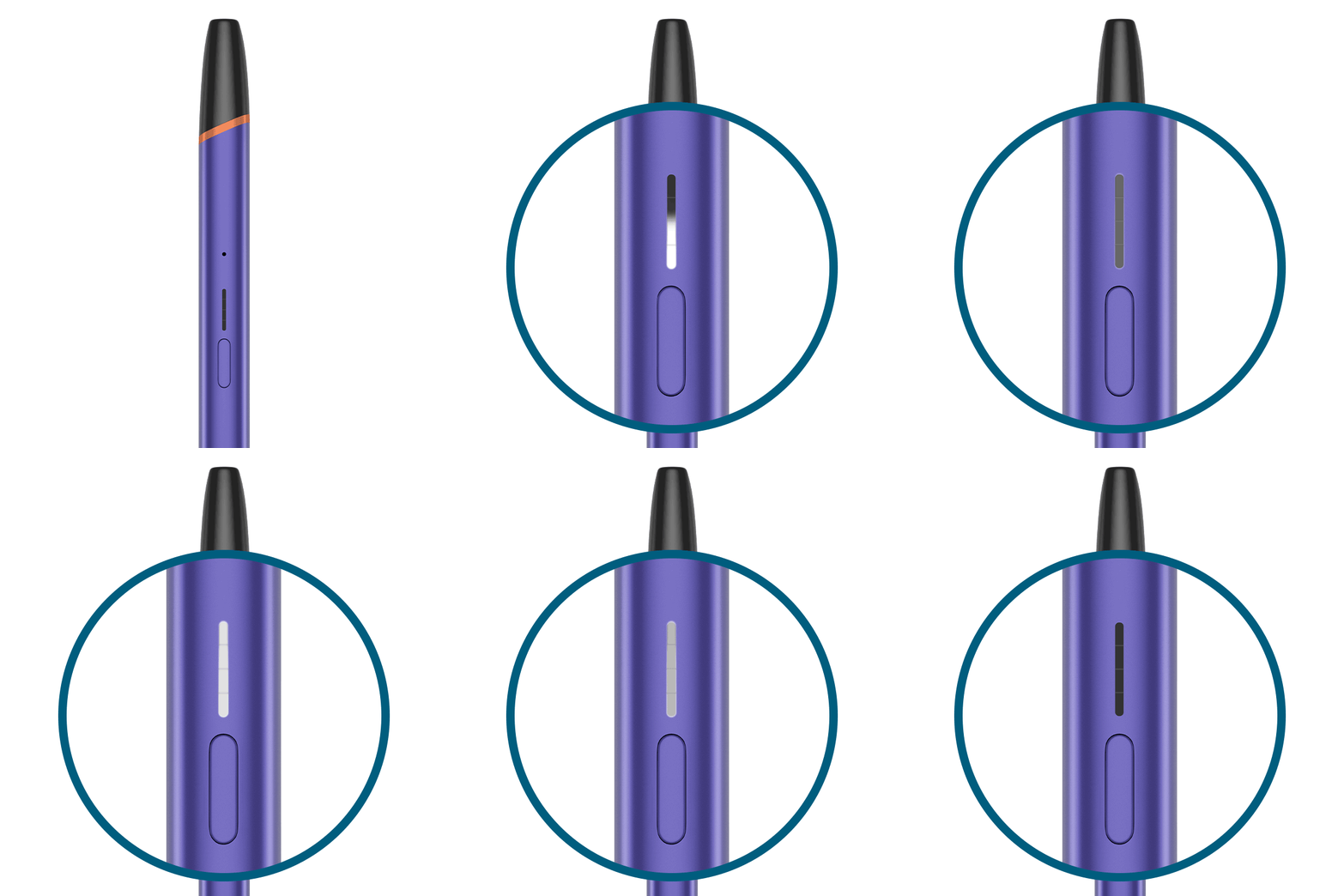
Blinking red light

    How to insert the pod

    There might be a contact issue between the pod and the device

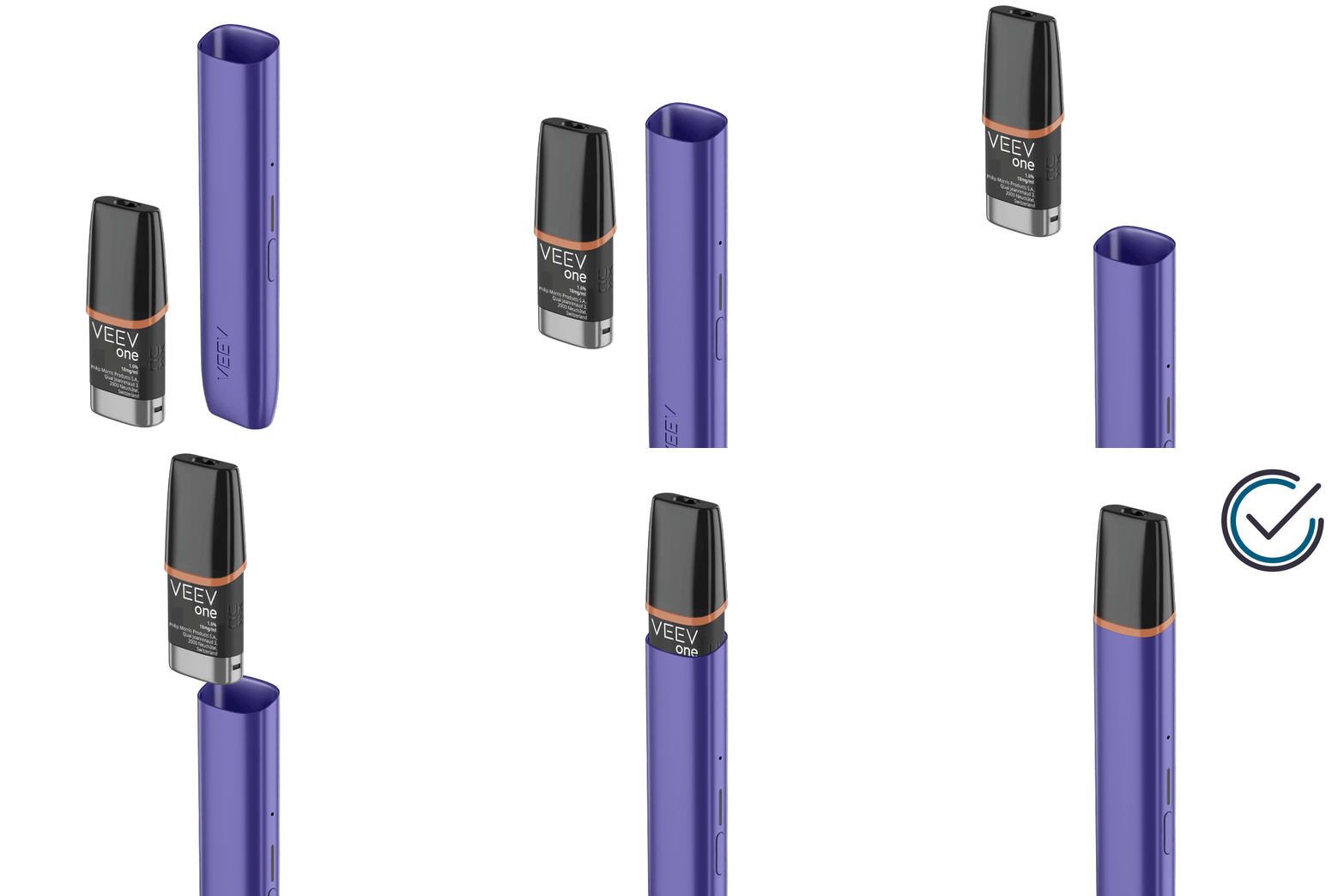
    1. Remove and re-insert correctly your pod following these steps:

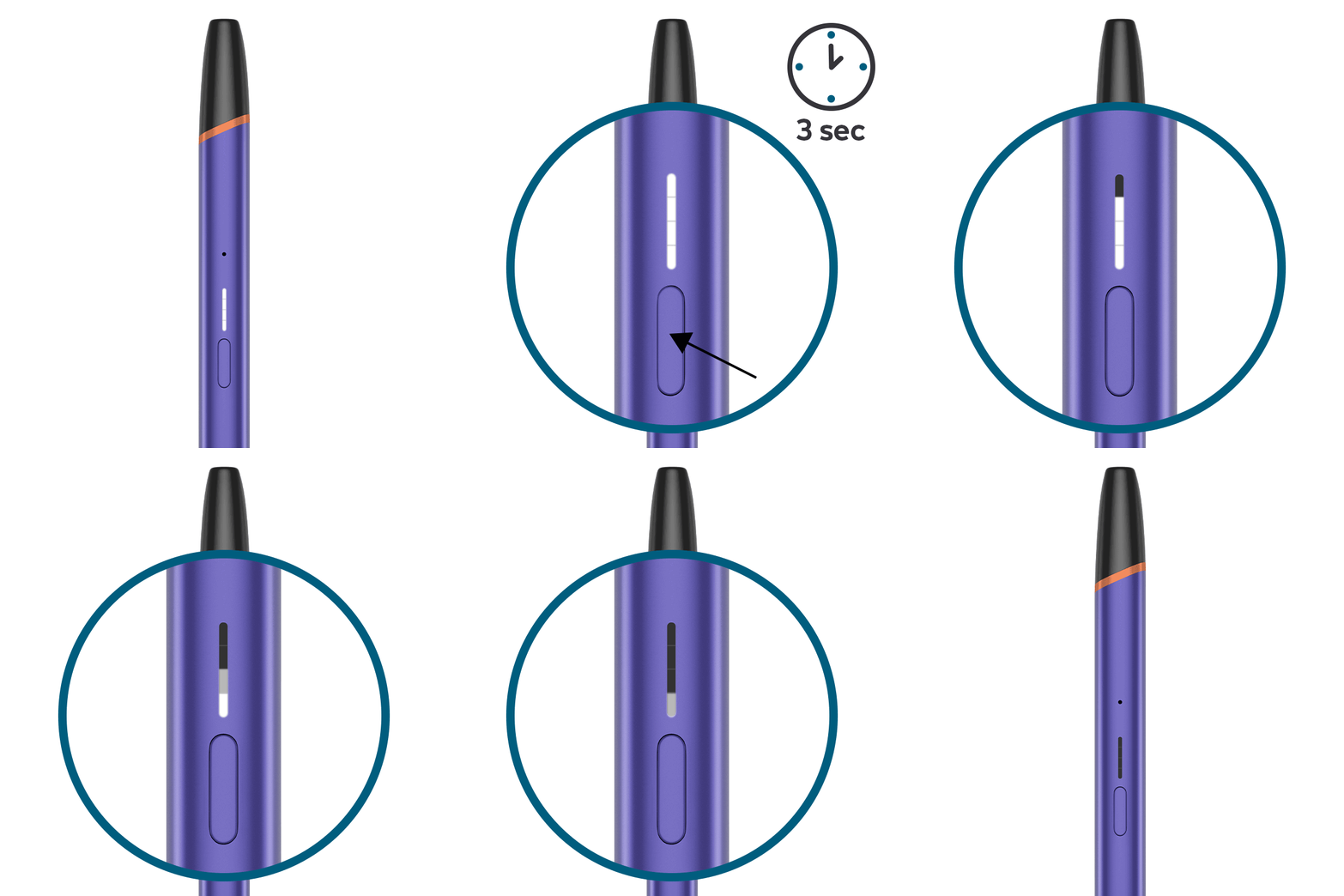
    ● Make sure your device is switched off by pressing the button for 3 seconds before cleaning

    ● Take the pod out

    ● Clean the contacts on both the device and the pod using a clean dry cloth

    ● Ensure to avoid contact of e-liquid with skin and eyes. In the event of skin contact, please wash immediately with soap and water and, in event of eye contact, rinse carefully with water for several minutes. If an ingestion occurs, rinse mouth and seek medical attention. Wash before reuse any contaminated clothing.

    ● Re - insert the pod ensuring that it is in the correct orientation and that it is fully pushed in place

    2. Turn the device back on by pressing the ON/OFF button for 3 seconds

    3. If the issue is not solved after following these steps, try using a new pod ensuring it is fully inserted.
After these steps, is your device working?
YES NO

Issue Resolved

     Congratulations! We are happy that you can now continue enjoying VEEV ONE.

    If you need any further support on your device, you can also visit our FAQs

    VEEV CUSTOMER CARE

FINISH

Blinking red light

    How to reset your device

    Your device might need a reset

    Perform a RESET by pressing and holding down the button for 10 seconds until status lights fade out

    ● In order to perform correctly the RESET, it is important to keep the button pressed for 10 seconds

    ● RESET is confirmed when status lights fade in again and status lights bling white twice

After RESET, is your device working?
YES NO

Issue Resolved

    Congratulations! We are happy that you can now continue enjoying VEEV ONE.

    If you need any further support on your device, you can also visit our FAQs

    VEEV CUSTOMER CARE

FINISH

Eligibility Check

    If your device is eligible we will replace it for you!

    If you proceed with eligibility check, you will not be able to return to the device diagnostics

Would you like to continue with an eligibility check?
START

There are lights on the device but no or low amount of aerosol when trying to puff

    How to turn off the device

    Your device might need to be cleaned

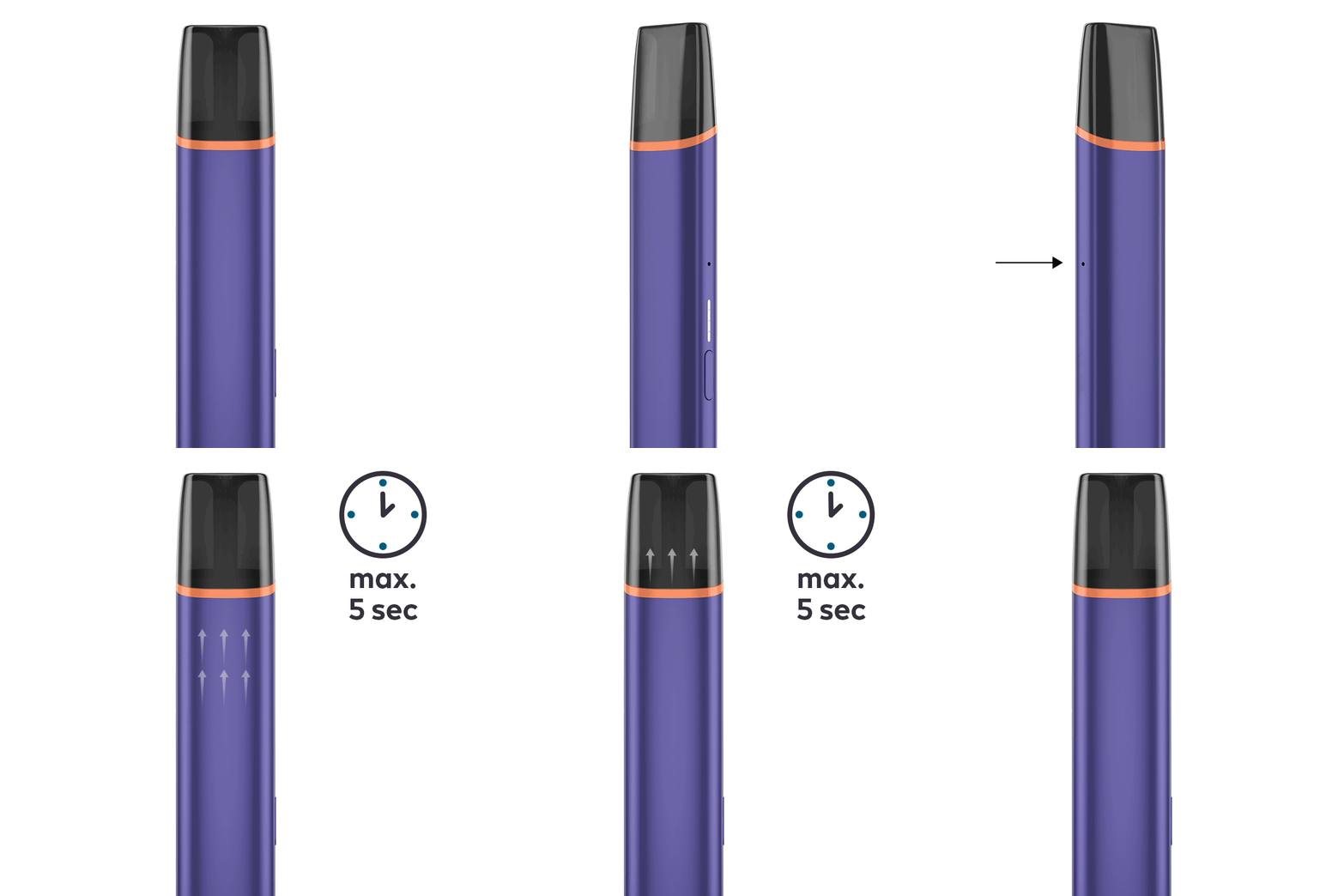
    ● Ensure that the airflow holes, placed on the side of the device, are not blocked when holding your VEEV ONE

    1. Ensure your device is clean from any potential liquid leakage. To clean your VEEV ONE, please follow these steps:

    ● Turn off the device. The device should not be cleaned whilst on

    ● Take the pod out. Do not use the pod if the pod appears to be damaged, tampered with, broken or leaking

    ● Clean the contacts on both the device and the pod using a clean dry cloth

    ● Ensure to avoid contact of e-liquid with skin and eyes. In the event of skin contact, please wash immediately with soap and water and, in event of eye contact, rinse carefully with water for several minutes. If an ingestion occurs, rinse mouth and seek medical attention. Wash before reuse any contaminated clothing.

    ● Re-insert the pod ensuring that it is in the correct orientation and that it is fully pushed in place.

    ● Turn back on the device by pressing the button for 3 seconds

After these steps, is your device working?
YES NO

Issue Resolved

    Congratulations! We are happy that you can now continue enjoying VEEV ONE.

    If you need any further support on your device, you can also visit our FAQs

    VEEV CUSTOMER CARE

FINISH

There are lights on the device but no or low amount of aerosol when trying to puff

    How to insert the pod

    There might be low e-liquid level in the pod

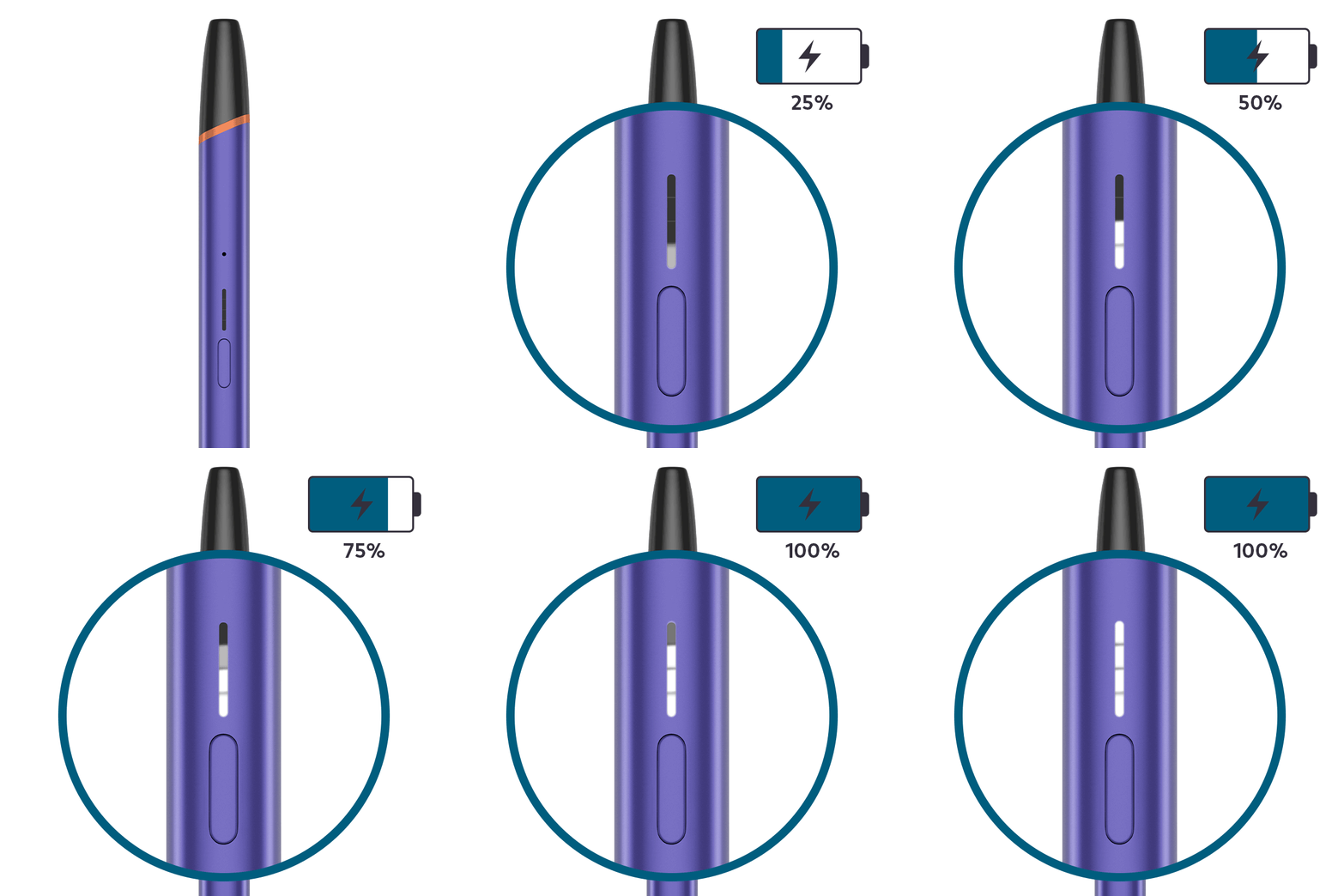
    1. Check if the top light of your device is blinking white 5 times when trying to puff: this indicates low e-liquid level in the pod

    2. Try using a new pod ensuring first that it is fully pushed in place:

    ● Take the old pod out

    ●Insert the new pod ensuring that it is in the correct orientation and that it is fully pushed in place

After these steps, is your device working?
YES NO

Issue Resolved

    Congratulations! We are happy that you can now continue enjoying VEEV ONE.

    If you need any further support on your device, you can also visit our FAQs

    VEEV CUSTOMER CARE

FINISH

There are lights on the device but no or low amount of aerosol when trying to puff

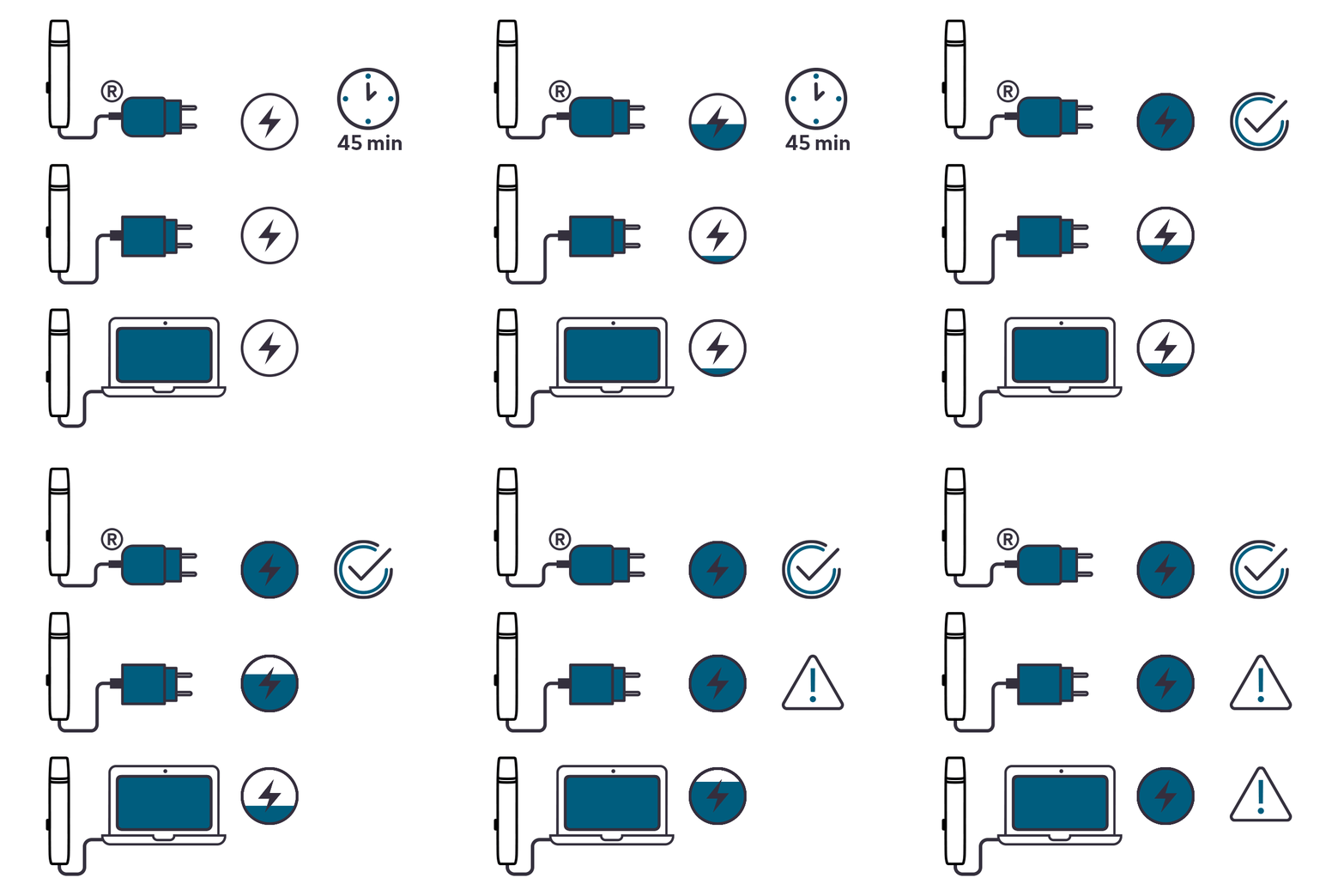
    A fully charge takes approximately 45 min

    Your device might be low on battery

    ● Please note: when low on battery, the bottom light of your device blink white 5 times

    1. Ensure the optimal charge for your device:

    ● For optimal charging performance, only use the manufacturer-approved Charging Cable supplied in the box and a certified AC Power Adaptor obtained from a reputable source

    ● Refrain from charging with a laptop. This may also interrupt the charging

    2. Plug the AC adaptor into a wall power outlet. VEEV ONE takes approximately 45 minutes to be fully charged 

After charging, did your device start working?
YES NO

Issue Resolved

    Congratulations! We are happy that you can now continue enjoying VEEV ONE.

    If you need any further support on your device, you can also visit our FAQs

    VEEV CUSTOMER CARE

FINISH

There are lights on the device but no or low amount of aerosol when trying to puff

    VEEV ONE operating temperature 

    Your device might be exposed to temperatures outside the intended temperature range for operation

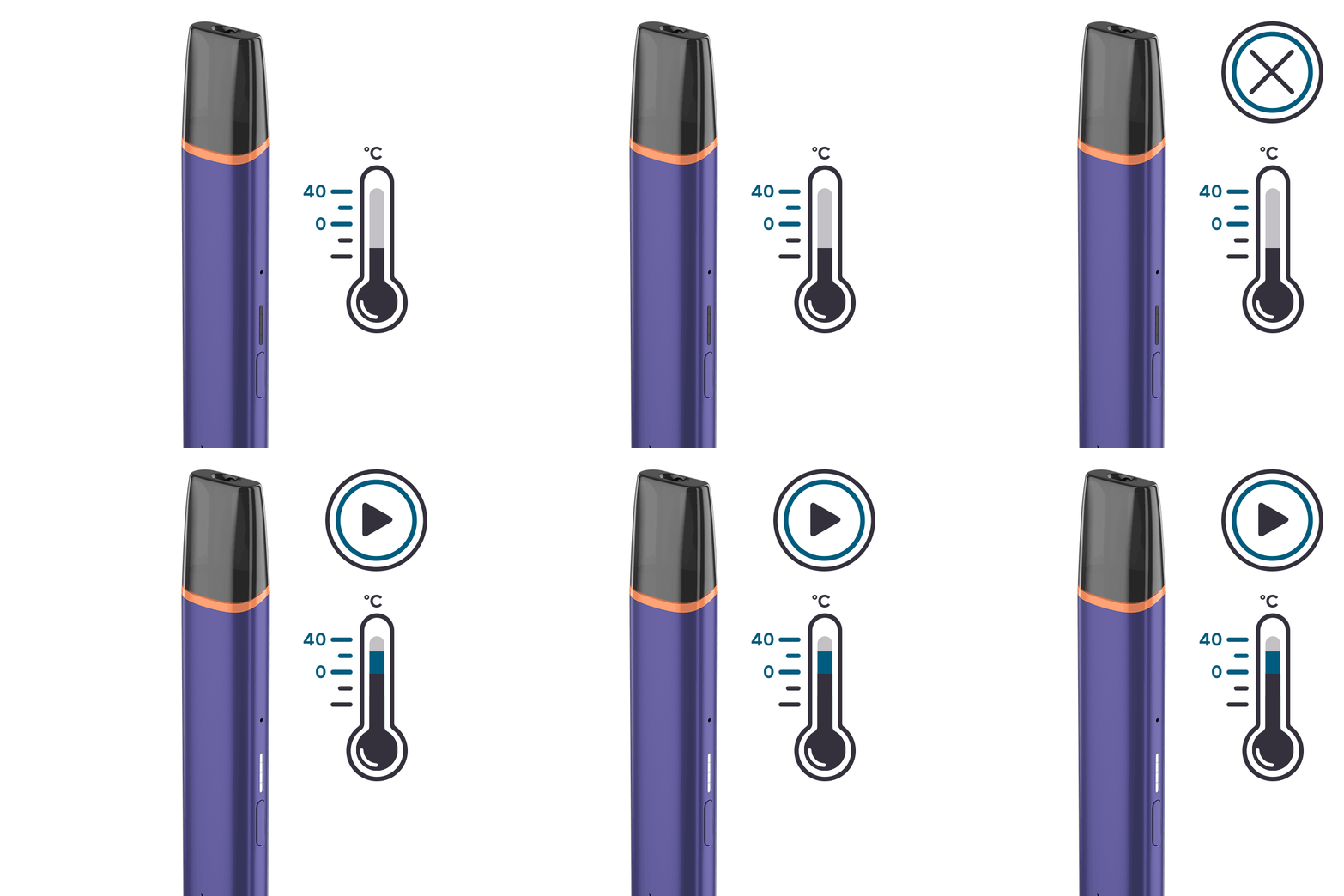
    You may need to give your device a few minutes to get back to the correct operating temperature. Please note:

    ● When a device is exposed to temperatures outside the intended temperature range for operation, all lights will flash white when trying to puff

    ● Your VEEV ONE is designed to operate between >0°C and <40°C

    ● Do not use VEEV ONE if it was exposed to excessive heat or moisture or placed near heat sources

    ● In case of exposure to low temperatures, allow your device to reach back the intended temperature range but do not expose it directly to heat source

After these steps, is your device working?
YES NO

Issue Resolved

    Congratulations! We are happy that you can now continue enjoying VEEV ONE.

    If you need any further support on your device, you can also visit our FAQs

    VEEV CUSTOMER CARE

FINISH

There are lights on the device but no or low amount of aerosol when trying to puff

    How to reset your device 

    Your device might need a RESET

    Perform a RESET by pressing and holding down the ON/OFF button for 10 seconds until status lights fade out

    ● In order to perform correctly the RESET, it is important to keep the button pressed for 10 seconds

    ● RESET is confirmed when status lights fade in again and status lights bling white twice

After RESET, is your device working?
YES NO

Issue Resolved

    Congratulations! We are happy that you can now continue enjoying VEEV ONE.

    If you need any further support on your device, you can also visit our FAQs

    VEEV CUSTOMER CARE

FINISH

Eligibility Check

    If your device is eligible we will replace it for you!

    If you proceed with eligibility check, you will not be able to return to the device diagnostics

Would you like to continue with an eligibility check?
START

Blinking white lights

    VEEV ONE operating temperature 

    Your device might be exposed to outside of its operating temperature range

    You may need to give your device a few minutes to get back to the correct operating temperature. Please note:

    ● When a device is exposed to temperatures outside the intended temperature range for operation, all lights will flash white when trying to puff

    ● Your VEEV ONE is designed to operate between >0°C and <40°C

    ● Do not use VEEV ONE if it was exposed to excessive heat or moisture or placed near heat sources

    ● In case of exposure to low temperatures, allow your device to reach back the intended temperature range but do not expose it directly to heat source

Visit our “Support” section to learn further tips about the maintenance of your device.
Learn more

Visit Get Support Page!

    Within “Get Support” page, you can find useful tip and tricks, and more information about your device usage and maintenance.

    VEEV CUSTOMER CARE

FINISH

Bottom light blinking white five times

    A fully charge takes approximately 45 min

    Your device might need to be charged

    1. Ensure the optimal charge for your device:

    ● For optimal charging performance, only use the manufacturer-approved Charging Cable supplied in the box and a certified AC Power Adaptor obtained from a reputable source

    ● Refrain from charging with a laptop. This may also interrupt the charging

    2. Plug the the AC adaptor into a wall power outlet. Please note: when deeply discharged, VEEV ONE takes approximately 45 minutes to be fully charged 

After charging, is your device working?
YES NO

Issue Resolved

    Congratulations! We are happy that you can now continue enjoying VEEV ONE.

    If you need any further support on your device, you can also visit our FAQs

    VEEV CUSTOMER CARE

FINISH

Bottom light blinking white five times

    How to reset your device

    Your device might need a RESET

    Perform a RESET by pressing and holding down the button for 10 seconds until status lights fade out

    ● In order to perform correctly the RESET, it is important to keep the button pressed for 10 seconds

    ● RESET is confirmed when status lights fade in again and status lights bling white twice

After RESET, is your device working?
YES NO

Issue Resolved

    Congratulations! We are happy that you can now continue enjoying VEEV ONE.

    If you need any further support on your device, you can also visit our FAQs

    VEEV CUSTOMER CARE

FINISH

Eligibility Check

    If your device is eligible we will replace it for you!

    If you proceed with eligibility check, you will not be able to return to the device diagnostics

Would you like to continue with an eligibility check?
START

Physical Damage

    A liquid damaged device

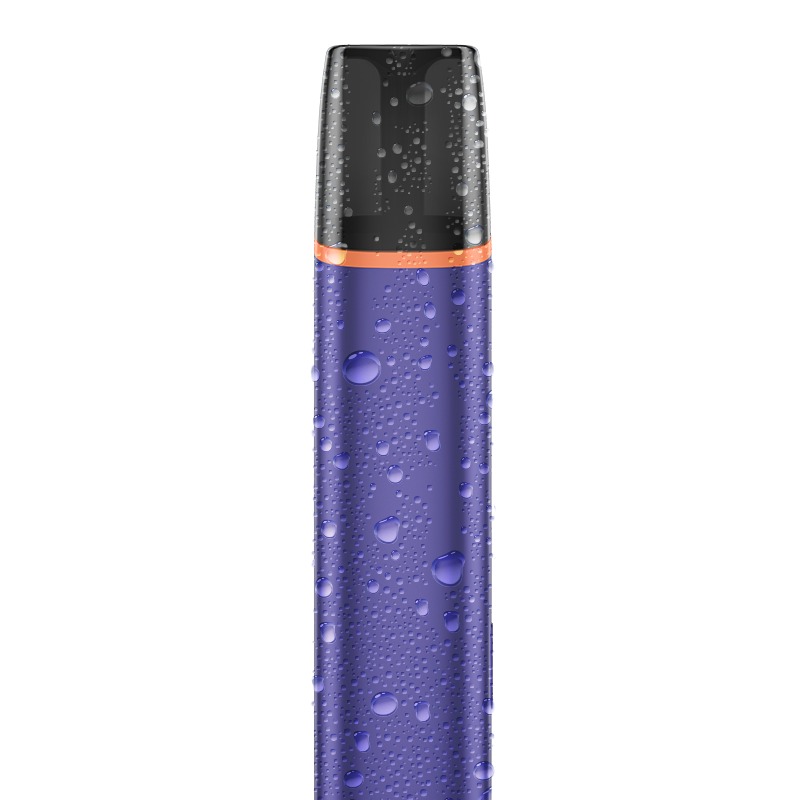
    There may have been liquid ingress into your device

Was your device exposed to liquids?
YES NO

Accidental Damage

    Accidental Damage is a free of charge service for our customers. It is offered as a support to replace the products which lost the functionality, after being subject to the damages that are not covered by voluntary warranty (e.g. drops, contacts with liquids or abrasive agents)

If your device is eligible, we will place a replacement order for you!
GO TO ELIGIBILITY CHECK

Physical Damage

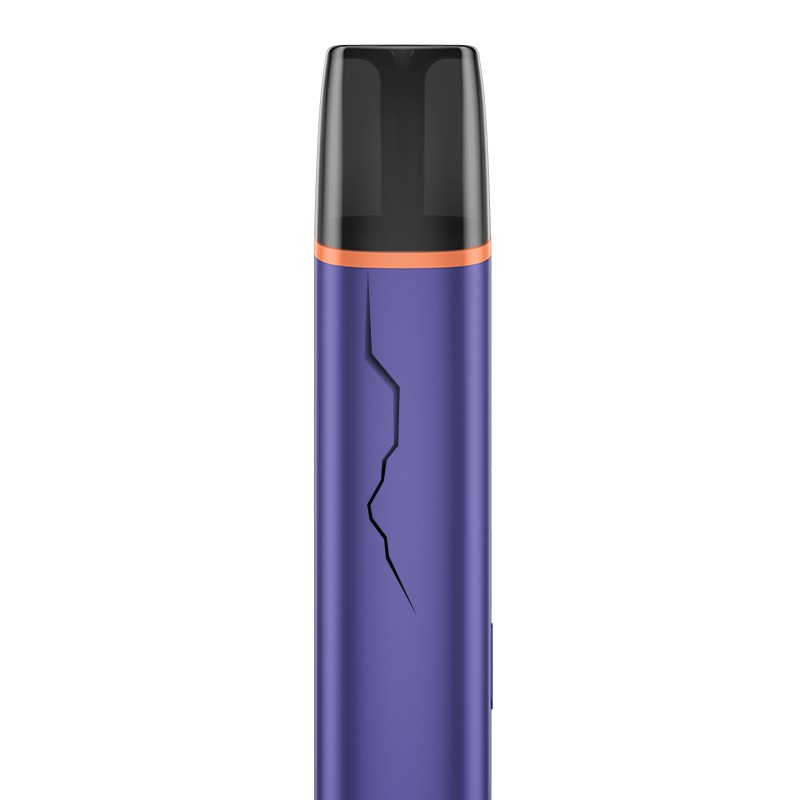
    A damaged device

    We are sorry your device has got damaged.

Are you still able to use it with this physical damage?
YES NO

Not Covered

    Cosmetic damages (such as scratches, dents, broken plastic, hairline cracks, discoloration), damage or failure caused by normal wear and tear of your device are excluded from voluntary warranty and myIQOS accidental damage coverage

    Our online store offers a wide range of accessories that could help you minimize the impact of the cosmetic damage.

    If you wish to reach a customer service representative, visit “contact us” page to choose the channel of your preference.

    VEEV CUSTOMER CARE

FINISH

Accidental Damage

    Accidental Damage is a free of charge service for our customers. It is offered as a support to replace the products which lost the functionality, after being subject to the damages that are not covered by voluntary warranty (e.g. drops, contacts with liquids or abrasive agents)

If your device is eligible, we will place a replacement order for you!
GO TO ELIGIBILITY CHECK

Device not charging

    How to check the battery level

    Your device might not be charged in the optimal condition 

    1. Ensure the optimal charge for your device:

    ● For optimal charging performance, only use the manufacturer-approved Charging Cable supplied in the box and a certified AC Power Adaptor obtained from a reputable source

    ● Refrain from charging with a laptop. This may also interrupt the charging

    2. Plug the the AC adaptor into a wall power outlet. Please note: VEEV ONE takes approximately 45 min to be fully charged

    Please note: when the device is exposed to temperatures outside the intended temperature range for operation, the charge may be affected. Allow your device to reach back the operating temperature, which is between >0°C and <40°C

After these steps, is your device working?
YES NO

Issue Resolved

    Congratulations! We are happy that you can now continue enjoying VEEV ONE.

    If you need any further support on your device, you can also visit our FAQs

    VEEV CUSTOMER CARE

FINISH

Eligibility Check

    If your device is eligible we will replace it for you!

    If you proceed with eligibility check, you will not be able to return to the device diagnostics

Would you like to continue with an eligibility check?
START

No lights on device on short button press

    How to turn ON your device

    Your device might be OFF

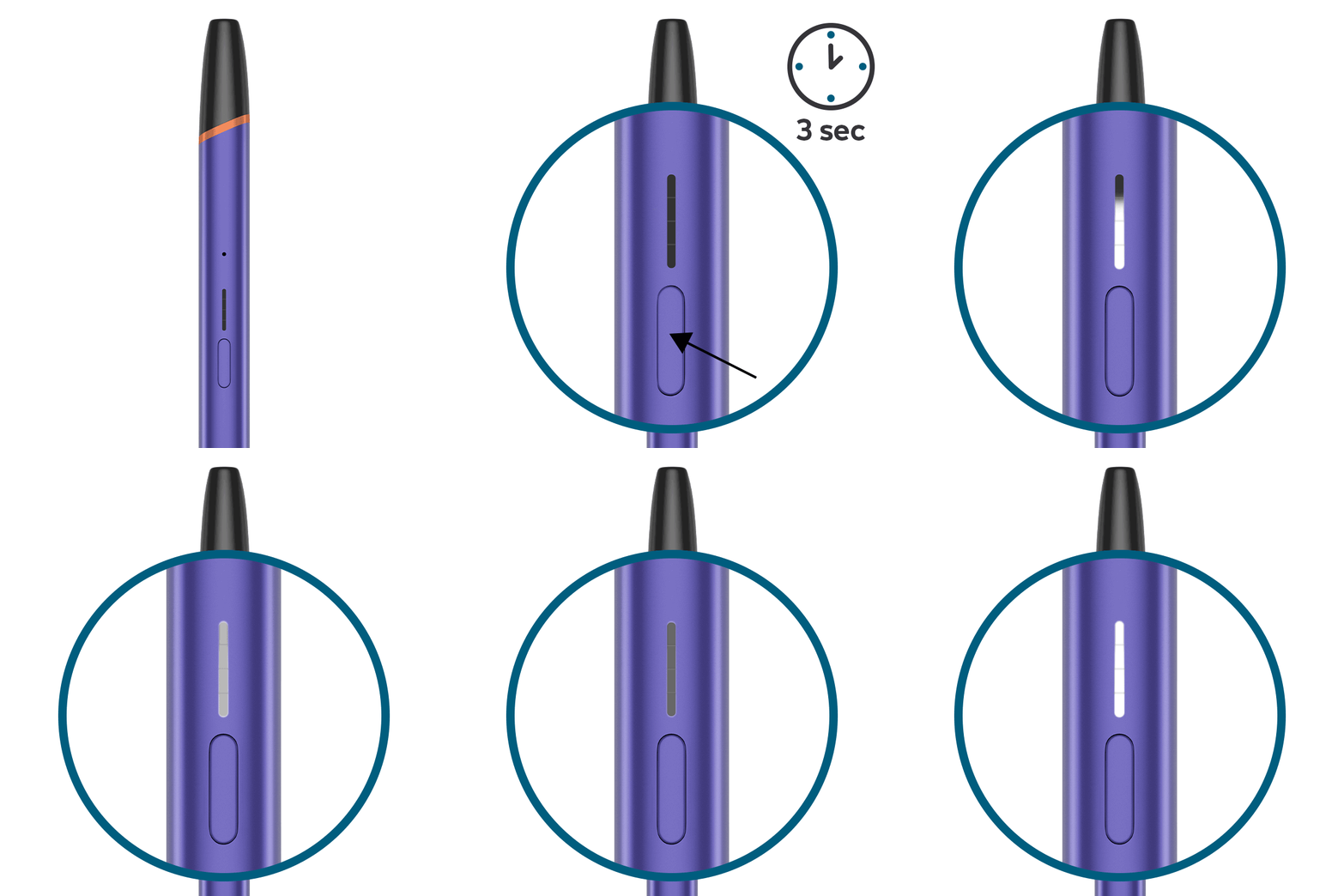
    Turn ON your device:

    ● Press and hold the button for 3 seconds, then release. Status lights will turn on slowly until they will become solid white and show the battery level

    Please note: the device can only be switched ON if a pod is inserted. When trying to switch ON without a pod, all LED will blink slowly once and the device will switch itself OFF.

After turning ON, is your device working?
YES NO

Issue Resolved

    Congratulations! We are happy that you can now continue enjoying VEEV ONE.

    If you need any further support on your device, you can also visit our FAQs

    VEEV CUSTOMER CARE

FINISH

No lights on device on short button press

    Ensure the optimal charging for your device

    Your device might be deeply discharged

    1. Ensure the optimal charge for your device:

    ● For optimal charging performance, only use the manufacturer-approved Charging Cable supplied in the box and a certified AC Power Adaptor obtained from a reputable source

    ● Refrain from charging with a laptop. This may also interrupt the charging

    2. Plug the the AC adaptor into a wall power outlet. Please note: when deeply discharged, VEEV ONE takes approximately 45 minutes to be fully charged 

    3. TURN ON your device by pressing and holding the button for 3 seconds

After charging your device, were you able to use it?
YES NO

Issue Resolved

    Congratulations! We are happy that you can now continue enjoying VEEV ONE.

    If you need any further support on your device, you can also visit our FAQs

    VEEV CUSTOMER CARE

FINISH

No lights on device on short button press

    How to reset your device

    Your device might need a RESET

    Perform a RESET by pressing and holding down the button for 10 seconds until status lights fade out

    ● In order to perform correctly the RESET, it is important to keep the button pressed for 10 seconds

    ● RESET is confirmed when status lights fade in again and status lights bling white twice

After RESET, is your device working?
YES NO

Issue Resolved

    Congratulations! We are happy that you can now continue enjoying VEEV ONE.

    If you need any further support on your device, you can also visit our FAQs

    VEEV CUSTOMER CARE

FINISH

No lights on device on short button press

    A liquid damaged device

    There may have been liquid ingress into your device

Was your device exposed to liquids?
YES NO

Accidental Damage

    Accidental Damage is a free of charge service for our customers. It is offered as a support to replace the products which lost the functionality, after being subject to the damages that are not covered by voluntary warranty (e.g. drops, contacts with liquids or abrasive agents)

If your device is eligible, we will place a replacement order for you!
GO TO ELIGIBILITY CHECK

No lights on device on short button press

    A damaged device

    Your device might be physically damaged

    We are sorry your device got damaged

Was the device handled according to the user instructions?
YES NO

Eligibility Check

    If your device is eligible we will replace it for you!

    If you proceed with eligibility check, you will not be able to return to the device diagnostics

Would you like to continue with an eligibility check?
START

Accidental Damage

    Accidental Damage is a free of charge service for our customers. It is offered as a support to replace the products which lost the functionality, after being subject to the damages that are not covered by voluntary warranty (e.g. drops, contacts with liquids or abrasive agents)

If your device is eligible, we will place a replacement order for you!
GO TO ELIGIBILITY CHECK

Top light blinking white five times

    How to insert the pod

    There might be low e-liquid level in the pod

    Try using a new pod ensuring it is fully inserted:

    ● Take the old pod out

    ● Insert the new pod ensuring that it is in the correct orientation and that it is fully pushed in place

    ● When a new VEEV ONE™ pod is inserted, status lights will turn on slowly to indicate that the device is ready for use

    Please note: You can always change the VEEV ONE™ pod while your VEEV ONE™ device is turned ON

After these steps, is your device working?
YES NO

Issue Resolved

    Congratulations! We are happy that you can now continue enjoying VEEV ONE.

    If you need any further support on your device, you can also visit our FAQs

    VEEV CUSTOMER CARE

FINISH

Top light blinking white five times

    How to reset your device

    Your device might need a RESET

    Perform a RESET by pressing and holding down the button for 10 seconds until status lights fade out

    ● In order to perform correctly the RESET, it is important to keep the button pressed for 10 seconds

    ● RESET is confirmed when status lights fade in again and status lights bling white twice

After RESET, is your device working?
YES NO

Issue Resolved

    Congratulations! We are happy that you can now continue enjoying VEEV ONE.

    If you need any further support on your device, you can also visit our FAQs

    VEEV CUSTOMER CARE

FINISH

Eligibility Check

    If your device is eligible we will replace it for you!

    If you proceed with eligibility check, you will not be able to return to the device diagnostics

Would you like to continue with an eligibility check?
START

Bottom light blinking white two times and aerosol delivery stopped

    How to puff

    This might be caused where the puff duration is longer than five seconds

    Ensure to not puff for more than five seconds in a single experience. When a puff lasts for more than five seconds, the device will stop the delivery of aerosol.

Visit “Get Support” section to learn further tips about the maintenance of your device.
Yes

Visit Get Support Page!

    Within “Get Support” page, you can find useful tip and tricks, and more information about your device usage and maintenance.

    VEEV CUSTOMER CARE

FINISH

Device leaking

    How to turn OFF the device

    [Knowledge only, NOT to communicate]

    Any leakage will be pod related as the e-liquid does not circulate through the device

    COMMUNICATE:

    ● The device needs to be cleaned before using a new pod

    CONFIRM TOGETHER WITH THE ADULT CONSUMER:

    1. Make sure the adult user turned off the device. The device should not be cleaned whilst on

    2. Advice the adult user to take the pod out. Do not use this product if the pod appears to be damaged, tampered with, broken or leaking

    3. Ask the adult user to clean the contact area on the device with a clean dry cloth and dispose the pod carefully

    4. Advice the adult user to avoid contact of e-liquid with skin and eyes. In the event of skin contact, wash immediately with soap and water and, in event of eye contact, rinse carefully with water for several minutes. If an ingestion occurs, rinse mouth and seek medical attention. Wash before reuse any contaminated clothing.

    5. Advice the adult user to insert a new pod ensuring that it is in the correct orientation and that it is fully pushed in place

    6. Turn on the device by pressing the button for 3 seconds

    DECIDE:

    According to the above steps and the consumer’s claim, make the decision:

    1. Option A: The device could be cleaned and the leakage issue is resolved. Do NOT replace

    2. Option B: The device could not be cleaned and the leakage issue is not resolved. Check if eligible for replacement

Choose the option from the below to continue
OPTION A OPTION B

Issue Resolved

    Congratulations! We are happy that you can now continue enjoying VEEV ONE.

    If you need any further support on your device, you can also visit our FAQs

    VEEV CUSTOMER CARE

FINISH

Eligibility Check

    If your device is eligible we will replace it for you!

    If you proceed with eligibility check, you will not be able to return to the device diagnostics

Would you like to continue with an eligibility check?
START

Overheating or plastic softening around the USB-C charging port/cable

    How to turn OFF the device

    [Knowledge only, NOT to communicate]

    A- This can happen whilst charging only. Can also be described by the user as melting

    B- This can be caused by contamination in the USB connectors that can interfere with the transmission of current and cause overheating.

    COMMUNICATE:

    1. Inform the user that contamination such as lint, dirt, dust or moisture in the USB connectors can interfere with the transmission of current from the power adaptor to the device and cause overheating.

    CONFIRM TOGETHER WITH THE ADULT CONSUMER:

    1. Tell the adult user to unplug the AC adaptor from the wall socket and leave the device to cool down before handling it

    2. Advice the adult user to turn the device OFF once it has cooled down.

    3. Make sure the device or charging cable is not damaged

    4. After ensuring the device and cable are not damaged, ask the adult user to clean or dry the USB-C port or both the device and the charging cable. Suggest to not use metal tool to clean the device in order to avoid damaging the device

    5. Ask the adult user to charge their device again under supervision and not to leave the device unattended for the first few minutes charge to check for potential overheating.

    DECIDE:

    • According to the above steps and the adult consumer’s claim, make the decision:

    1. Option A: Adult customer’s device or charging cable is damaged: physical damage, not covered under warranty but one replacement is allowed under Accidental Damage.

    2. Option B: Adult Customer’s device is now working properly. Issued resolved. DO NOT replace

Choose the option from the below to continue
OPTION A OPTION B

Accidental Damage

    Accidental Damage is a free of charge service for our customers. It is offered as a support to replace the products which lost the functionality, after being subject to the damages that are not covered by voluntary warranty (e.g. drops, contacts with liquids or abrasive agents)

If your device is eligible, we will place a replacement order for you!
GO TO ELIGIBILITY CHECK

Issue Resolved

    Congratulations! We are happy that you can now continue enjoying VEEV ONE.

    If you need any further support on your device, you can also visit our FAQs

    VEEV CUSTOMER CARE

FINISH

I couldn’t find my issue amongst these options

    How to Reset the device

    [Knowledge only, NOT to communicate]

    When VEEV ONE is not functioning as expected, usually some generic steps help to resolve the issue

    COMMUNICATE:

    ● The device might need to be charged before using a new pod

    CONFIRM TOGETHER WITH THE ADULT CONSUMER:

    1. Ensure the optimal charge for your device only using the manufacturer-approved Charging Cable supplied in the box and a certified AC Power Adaptor obtained from a reputable source. Refrain from charging with a laptop. VEEV ONE takes approximately 45 minutes to be fully charged

    2. Tell the adult user to turn off the device and ake the pod out. Advice to not use the pod if the pod appears to be damaged, tampered with, broken or leaking

    3. Tell the adult user to clean the contacts on both the device and the pod using a clean dry cloth

    ● Advice the adult user to avoid contact of e-liquid with skin and eyes. In the event of skin contact, wash immediately with soap and water and, in event of eye contact, rinse carefully with water for several minutes. If an ingestion occurs, rinse mouth and seek medical attention. Wash before reuse any contaminated clothing.

    4. Tell the adult user to re-insert the pod ensuring that it is in the correct orientation and that it is fully pushed in place and urn the device back on by pressing the ON/OFF button for 3 seconds

    5. Advice the adult user to try with RESET by keeping the button pressed for 10 seconds until status lights bling white twice

    DECIDE:

    • According to the above steps and the adult consumer’s claim, make the decision:

    ● Option A: The device is now working and issue is resolved. Do NOT replace

    ● Option B: The device is still not working and issue is not resolved. Check if eligible for replacement

Choose the option from the below to continue
OPTION A OPTION B

Issue Resolved

    Congratulations! We are happy that you can now continue enjoying VEEV ONE.

    If you need any further support on your device, you can also visit our FAQs

    VEEV CUSTOMER CARE

FINISH

Eligibility Check

    If your device is eligible we will replace it for you!

    If you proceed with eligibility check, you will not be able to return to the device diagnostics

Would you like to continue with an eligibility check?
START

Great!

Enjoy using your VEEV One

DONE
This product is not risk-free and provides nicotine, which is addictive. Only for use by adults (21+).
Prohibited from selling and giving to persons under 21 years of age and pregnant women.
This product is not risk-free and provides nicotine, which is addictive. Only for use by adults (21+).
Prohibited from selling and giving to persons under 21 years of age and pregnant women.
This product is not risk-free and provides nicotine, which is addictive. Only for use by adults (21+).
Prohibited from selling and giving to persons under 21 years of age and pregnant women.
  1. HOME
  2. M0016_GLOBAL

  • Discover VEEV ONE
  • Discover VEEV NOW Ultra
  • Buy VEEV ONE
  • Buy VEEV NOW Ultra
  • Find Us

  • Get Support
  • FAQs
  • Youtube
  • Facebook
  • Instagram
  • Contact Us

  • General Terms & Conditions of Sale
  • General Terms & Conditions of Program

We accept

We accept We accept We accept We accept We accept We accept We accept We accept

© 2023 Philip Morris International. All rights reserved.

  • Privacy Notice
  • Terms and Condition
  • Cookie Preferences
  • Company Information
  • English
  • Indonesia


Please confirm you are an adult user of nicotine products aged 21+

Please confirm you are an adult user of nicotine products aged 21+.

Please confirm you are an adult user of nicotine products aged 21+.

Please provide month of birth
Please provide year of birth

Are you an adult smoker or an adult nicotine product user over 21 years old?

Sorry! This website is intended only for users of nicotine or tobacco products who are over 21.

This website contains information about smoke free product and we need your confirmation that you are an adult smoker or user of nicotine products to make sure that you are an adult in Indonesia who would otherwise continue to smoke or use nicotine products.

Country redirect

IQOS

Please note this site is intended for Indonesia. In order to ensure compliance with local legal requirement, we need to redirect you to your country of origin..

CONTINUE Arrow right